Dishwasher Reset Guide: Fixes for Common Issues
Master dishwasher resets with easy steps for all major brands and models.
Understanding When Your Dishwasher Needs a Reset
Your dishwasher is an essential kitchen appliance that handles the tiresome task of cleaning dishes automatically. However, like all electronic devices, it occasionally encounters glitches that prevent it from operating correctly. Recognizing the signs that your dishwasher requires a reset is the first step toward restoring its functionality.
Several indicators suggest your dishwasher would benefit from a reset procedure. A malfunctioning control panel that doesn’t respond to button presses is a primary warning sign. When you attempt to initiate a cycle or adjust settings but the machine ignores your commands, an electronic reset may restore responsiveness. Similarly, if your dishwasher displays recurring error codes on its digital display, these flashing indicators often point to temporary sensor malfunctions or software inconsistencies rather than permanent damage.
Another common scenario is when your dishwasher begins a wash cycle but halts midway, leaving standing water and unwashed dishes inside. This interruption suggests an internal processing error that a reset can sometimes resolve. Additionally, if the cycle completion light blinks erratically or the entire unit seems unresponsive despite having power, a reset procedure should be your first troubleshooting approach before contacting a professional technician.
The Power Disconnection Method: A Universal Approach
The most straightforward and universally applicable reset technique involves disconnecting your dishwasher from its electrical power source. This method works across virtually all dishwasher brands and models because it forces the internal electronic components to discharge completely, clearing temporary glitches and error memory.
For dishwashers connected to a standard electrical outlet, locate the power cord typically positioned behind or beneath the unit. Carefully unplug the cord from the wall outlet, ensuring you’re disconnecting the correct appliance. For hardwired dishwashers connected directly to your home’s electrical system, you’ll need to access your home’s circuit breaker panel instead. Identify the breaker switch dedicated to your dishwasher—these are often labeled clearly or located near other kitchen appliance breakers—and flip it to the off position.
The critical element in this process is allowing sufficient time for the internal capacitors to fully discharge. Wait between 5 to 10 minutes before restoring power. This waiting period ensures that all residual electrical charge dissipates from the system’s memory circuits, effectively erasing any error codes or system glitches. After the waiting period expires, reconnect the power by plugging the cord back into the outlet or switching the circuit breaker back to the on position.
To confirm the reset was successful, run a test cycle without placing any dishes inside the machine. Select a standard wash cycle, close the door securely, and allow the dishwasher to complete its operation. This test run helps verify that the reset resolved the underlying issue without risking damage to your dishes.
Control Panel Button Sequences for Direct Resets
Many modern dishwashers include built-in reset functions accessible through specific button combinations on the control panel. These direct resets offer a faster alternative to power disconnection and don’t require waiting periods. Understanding the correct sequence for your particular model prevents frustration and speeds up the troubleshooting process.
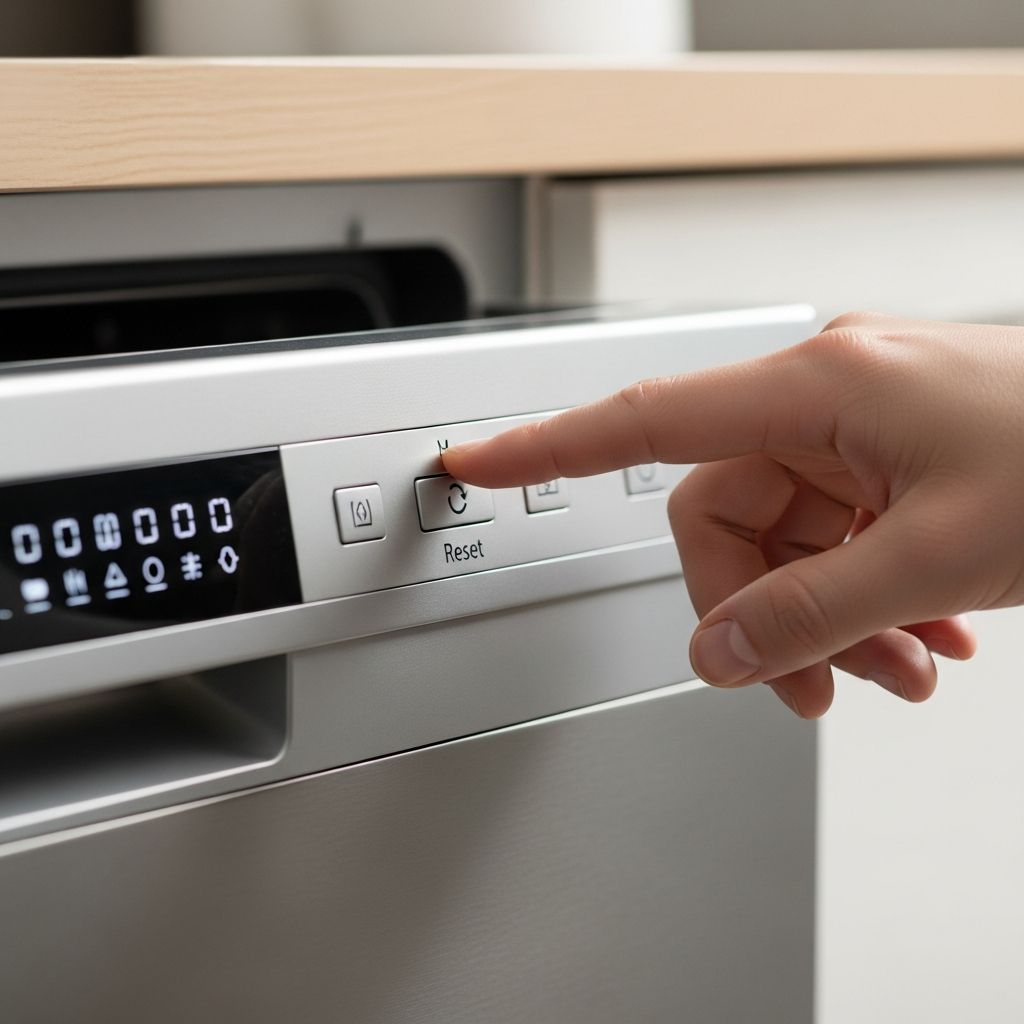
The most common control panel reset involves the Start or Reset button located prominently on your dishwasher’s interface. Typically, you’ll need to press and hold this button for approximately 3 to 5 seconds. During this period, watch for visual or auditory feedback indicating the reset is processing. Many dishwashers emit a distinctive beep or chime when the reset sequence completes successfully. Some models display a zero, the word ‘End,’ or a brief light flash to confirm the operation.
Alternative reset sequences may require pressing multiple buttons in a specific order or combination. Common patterns include alternating presses of buttons such as ‘Normal Wash’ and ‘Heated Dry,’ or pressing ‘Cancel’ followed by additional buttons. The exact sequence varies significantly between manufacturers and model generations, making your user manual an invaluable reference. If you’ve misplaced the manual, most manufacturers provide digital copies on their websites, searchable by model number.
When attempting control panel resets, ensure your hands are clean and dry, especially on touchscreen models where moisture can interfere with button registration. Press firmly and deliberately, holding buttons for the full duration specified rather than releasing too quickly. If the reset doesn’t trigger after the first attempt, wait a few moments before trying again, as some systems require a brief pause between attempts.
Brand-Specific Reset Procedures
Different manufacturers design their dishwashers with distinct control systems and reset protocols. Learning the specific approach for your brand streamlines the troubleshooting process and increases the likelihood of successful resolution on the first attempt.
Bosch Dishwasher Reset Instructions
Bosch dishwashers, recognized for their reliable engineering and intuitive design, respond well to straightforward reset procedures. Locate the Start button on your Bosch control panel and press it firmly for approximately 4 seconds. You’ll notice the unit begins draining residual water from the internal chamber—a process that typically takes about one minute to complete. Once the drainage finishes, press the On/Off button to fully disengage the cycle. For Bosch models equipped with digital displays, a successful reset often displays a ‘0’ or ‘End’ message on the screen.
Samsung Dishwasher Reset Process
Modern Samsung dishwashers frequently incorporate digital diagnostic systems that respond to simple button combinations. The primary reset method involves locating the Start/Reset button and pressing it continuously for roughly 3 seconds. A distinctive chime or beep signal indicates the reset has activated successfully. Samsung touchscreen models may require particular attention to ensure proper contact—use firm, direct finger pressure on the designated button area. If using a touchscreen interface, confirm your fingertips are completely dry, as moisture prevents accurate sensor registration and may necessitate repeated attempts.
LG Smart Dishwasher Recalibration
LG’s technologically advanced dishwashers often incorporate smart features requiring a unique reset approach. The preferred method involves pressing both the ‘Cancel’ and ‘Drain’ buttons simultaneously. After activating this combination, completely power down your LG dishwasher for approximately 10 seconds by flipping the circuit breaker or unplugging the unit. This brief disconnection combined with the button sequence creates a comprehensive system refresh. Upon restoring power, the dishwasher’s software resets to its default state, ready to process new wash cycles without previous error codes interfering with operation.
Maytag Dishwasher Reset Sequences
Maytag dishwashers typically employ manual reset sequences that require pressing specific button combinations in a predetermined order. Access your Maytag’s user manual to identify the exact sequence for your model—these often involve alternating presses of buttons like ‘Normal’ and ‘Heated Dry’ or similar combinations. Open the dishwasher door to access the control panel more easily, then execute the button sequence precisely as documented. This methodical approach clears error codes stored in the electronic memory and restores normal functionality to your appliance’s control systems.
GE Dishwasher Reset Workflow
General Electric dishwashers respond effectively to a structured reset procedure that combines power cycling with control panel confirmation. Begin by completely powering off your GE unit through either unplugging or circuit breaker disconnection. Maintain the power-off state for a minimum of 5 minutes, allowing internal electronic components to discharge fully. Restore power by plugging the dishwasher back in or switching the circuit breaker to the on position. Once power returns, open the dishwasher door, select a new wash cycle on the control panel, and press the ‘Start’ button to initiate a test run. If your GE model includes a dedicated ‘Cancel’ or ‘Reset’ button, press it to clear any lingering error messages from the previous cycle.
Advanced Troubleshooting for Persistent Issues
In situations where standard reset procedures fail to resolve your dishwasher’s problems, a more thorough diagnostic approach becomes necessary. Understanding the distinction between temporary software glitches and mechanical failures helps you determine whether professional service is required.
When your dishwasher displays specific error codes that persist even after multiple reset attempts, the error code itself provides valuable diagnostic information. Consult your manufacturer’s documentation or the brand’s support website to decode what each error number signifies. Some codes indicate sensor malfunctions, while others point to water supply issues, drainage problems, or heating element failures. Recording the specific error code before contacting customer support ensures the technician understands your situation precisely.
Power cycling for extended durations offers another troubleshooting option for stubborn electronic glitches. Rather than the standard 5-minute disconnection, attempt disconnecting power for 15 minutes or longer. This prolonged absence of electrical current can resolve more entrenched software issues that brief resets cannot address. Additionally, verify that your dishwasher receives adequate water pressure from your home’s water supply and that the drain line isn’t obstructed—these mechanical factors sometimes trigger error codes that mimic electronic failures.
If your dishwasher’s control panel remains unresponsive after multiple reset attempts, or if it displays error codes you cannot decode, contacting the manufacturer’s customer support service is advisable. Providing them with your model number, the specific error codes displayed, and a description of the problems you’ve observed enables them to recommend appropriate solutions or arrange professional repair if necessary.
Circuit Breaker Reset Procedures
For hardwired dishwashers, resetting the circuit breaker provides an alternative to unplugging. Locate your home’s electrical panel—typically found in a basement, garage, or utility closet. Identify the breaker switch dedicated to your kitchen dishwasher, which is usually labeled accordingly. Flip this switch to the off position, wait 30 seconds to a few minutes, then flip it back to the on position. This complete power interruption achieves the same effect as unplugging, forcing a full system reset.
Power outages frequently trip circuit breakers as a protective measure, which may explain why your dishwasher stopped working suddenly. Before assuming your dishwasher requires repair, always check whether the dedicated breaker has switched to the off position. Simply resetting this breaker often restores functionality immediately, saving you time and potential service call expenses.
Preventive Maintenance to Avoid Future Resets
Regular maintenance reduces the frequency of unexpected glitches and the need for repeated reset procedures. Cleaning your dishwasher’s filter monthly prevents debris accumulation that can trigger sensor errors and drainage problems. Inspect the spray arms for blockages that might impede water circulation and cause incomplete cycles. Running an empty cycle with a commercial dishwasher cleaner every few months eliminates mineral buildup inside the machine, which can interfere with electronic sensors.
Additionally, ensure your dishwasher receives proper water pressure and drainage. Check the inlet water line for kinks or restrictions, and verify that the drain hose isn’t bent or blocked. Adequate water pressure and unobstructed drainage prevent the electronic system from triggering false error codes due to pressure sensors or flow monitors malfunctioning in response to actual mechanical problems.
Following your manufacturer’s usage guidelines, including recommended detergent quantities and cycle selections appropriate for your water type, contributes to long-term reliability. Overloading the dishwasher or using excessive detergent can trigger premature failure of sensors and drainage systems, necessitating resets or repairs.
Frequently Asked Questions About Dishwasher Resets
Q: How long should I wait before plugging my dishwasher back in after unplugging it?
A: Wait at least 5 to 10 minutes to allow internal capacitors to fully discharge. For stubborn issues, waiting 15 minutes or longer can be more effective.
Q: Will a reset erase my dishwasher’s settings?
A: A standard reset typically clears temporary error codes and glitches but usually preserves saved settings and preferences. However, check your manual to confirm, as some advanced resets may restore default settings.
Q: What should I do if my dishwasher still doesn’t work after resetting?
A: If multiple reset attempts fail, check for error codes and consult your user manual. Verify water supply and drainage connections, and contact the manufacturer’s customer support if problems persist.
Q: Can I reset my dishwasher while it’s running a cycle?
A: Yes, you can interrupt a cycle using the cancel or pause functions, but allow it to drain completely before attempting other resets to prevent water damage.
Q: Is it safe to unplug my dishwasher for a reset?
A: Yes, unplugging your dishwasher is a standard and safe reset method. For hardwired models, using the circuit breaker achieves the same result safely.
Q: How often should I reset my dishwasher?
A: Resets should be occasional troubleshooting steps, not regular maintenance. If you’re resetting frequently, investigate underlying issues or contact a technician.
References
- How to Reset a Dishwasher: A Step-by-Step Guide — Taunton Appliance Repairs. 2024. https://taunton-appliance-repairs.co.uk/how-to-reset-a-dishwasher-a-step-by-step-guide
- How to Reset a GE Dishwasher: Step-by-Step Troubleshooting Guide — Kenco. 2024. https://www.kenco.org/blog/how-to-reset-a-ge-dishwasher-step-by-step-troubleshooting-guide
- How to Reset a Dishwasher That Won’t Start — Whirlpool. 2025. https://www.whirlpool.com/blog/kitchen/how-to-reset-dishwasher.html
- How to Reset the Dishwasher or Stop a Wash Cycle — Bosch Home. 2025. https://www.bosch-home.com/us/owner-support/get-support/how-to-reset-the-dishwasher-or-stop-a-wash-cycle
- How to Reset a Dishwasher After a Power Outage — Hoffman Brothers. 2024. https://www.hoffmannbros.com/dishwashwer-guide/how-to-reset-a-dishwasher-after-a-power-outage
Similar Articles


Read full bio of medha deb