GE Dishwasher Troubleshooting: Complete Reset Guide
Master the art of resetting your GE dishwasher with proven methods for every model.
Understanding GE Dishwasher Reset Procedures
When your GE dishwasher encounters operational difficulties, performing a reset can often resolve the issue without requiring professional intervention. Whether your appliance has stopped responding to commands, become stuck mid-cycle, or is displaying unusual error codes, understanding the various reset methods available can help restore normal functionality. This comprehensive guide explores the different approaches you can take to reset your GE dishwasher, each suited to different types of problems and dishwasher models.
A reset essentially clears the dishwasher’s control board memory and restarts its internal systems. This process can eliminate temporary glitches that develop during normal operation. Different GE dishwasher models feature varying control systems, so having knowledge of multiple reset techniques ensures you can address issues regardless of your specific model’s design.
The Fundamental Power Cycle Method
The most straightforward approach to resetting a GE dishwasher is performing a basic power cycle, which involves interrupting electrical flow to the appliance. This method works by allowing the control board to discharge all stored information, essentially giving the system a fresh start when power is restored.
Begin this process by identifying how your dishwasher receives power. Some models plug directly into wall outlets, while others are hardwired directly into your home’s electrical system. For plug-in models, simply unplug the dishwasher from the wall socket. For hardwired units, you’ll need to access your home’s circuit breaker panel and locate the breaker controlling the dishwasher circuit.
Once you’ve disconnected the power, allow the appliance to remain unpowered for a full minute. This duration gives the internal capacitors sufficient time to fully discharge, ensuring a complete system reset. After waiting, restore power by either plugging the unit back in or flipping the circuit breaker switch to the on position.
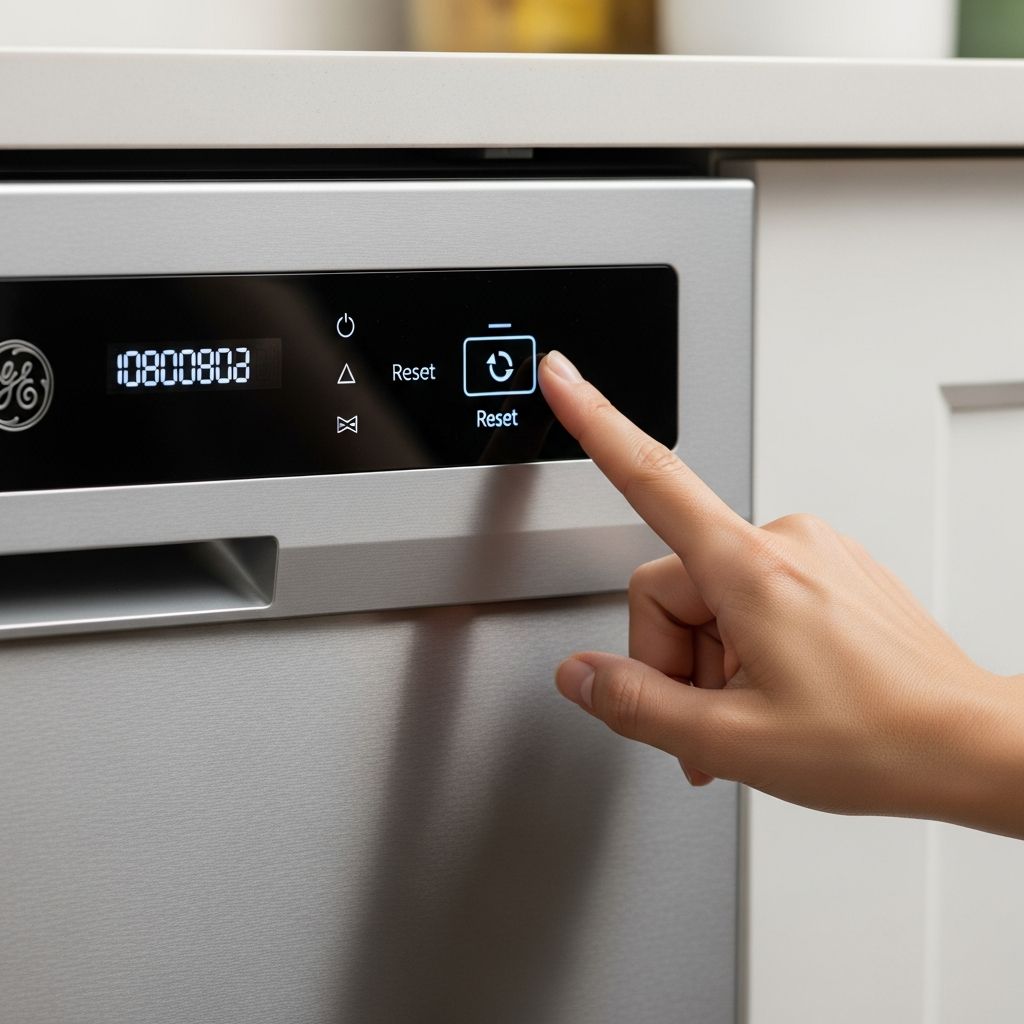
Following power restoration, press and hold the start or reset button on your dishwasher’s control panel for approximately five seconds. You may observe indicator lights flickering or hear a beeping sound, which indicates the reset sequence is completing. The dishwasher should now be ready to operate normally, and you can initiate a new wash cycle.
Control Panel Reset for Responsive Dishwashers
If your GE dishwasher is powered on and responding to button presses but experiencing operational issues, a soft reset through the control panel offers a targeted solution. This method doesn’t require accessing circuit breakers or waiting extended periods, making it ideal for quick troubleshooting.
Locate the start button on your dishwasher’s control panel. This button may be labeled as “Start,” “Start/Reset,” or simply feature a play symbol. Press and hold this button firmly for five seconds while keeping the dishwasher door closed. During this interval, you may notice indicator lights illuminating, buttons lighting up, or hear audible feedback from the appliance. These visual and auditory cues confirm that the reset process is initiating.
This softer approach works particularly well when your dishwasher is stuck mid-cycle or won’t initiate a new washing program. By resetting the control panel without cutting all power, you preserve any settings you’ve configured while clearing any temporary processing errors that may be preventing normal operation.
Advanced Control Board Reset Using Button Combinations
For more complex operational issues, GE dishwashers equipped with digital control panels often feature an advanced reset capability accessed through button combinations. This method provides a deeper system reset than simple power cycling or single-button resets.
The exact button combination varies by model, but the most common approach involves the start button and select cycle button. Locate both buttons on your control panel and ensure your dishwasher door is closed and the unit is powered on. Simultaneously press and hold both the start button and the select cycle button for five to ten seconds.
While holding these buttons, monitor your control panel for activity. The display may flash, lights may illuminate in sequences, or you might hear multiple beeping sounds. These responses indicate the control board is performing an internal diagnostic and reset sequence. Continue holding until you observe these indicators, then release the buttons and allow the dishwasher several seconds to complete its internal processes.
If your model includes a service mode feature, this button combination may activate that diagnostic interface. In service mode, individual components can be tested by pressing the select cycle button repeatedly, which cycles through different system components. Each component typically corresponds to a specific number of light blinks in your user manual. To exit service mode and complete the reset, press and hold the start button again for five seconds.
Reset Switch Access Through the Kick Plate
Certain GE dishwasher models incorporate a dedicated reset switch located beneath the kick plate at the appliance’s base. The kick plate is the removable panel that spans the bottom of the dishwasher where your toes would go when standing in front of it.
To access this reset switch, you’ll need basic tools including a screwdriver or wrench. Examine the kick plate’s edges for visible screws or fasteners, typically three to five of them depending on your model. Carefully remove these fasteners and set them aside in a safe location where they won’t be lost. Gently pull the kick plate away from the dishwasher body, ensuring no wiring is attached to it.
Behind the kick plate, you’ll find various mechanical and electrical components. Look for a button or switch clearly labeled “Reset.” Some models may have multiple switches, so consulting your user manual helps identify the correct component. Once located, press this switch firmly. Unlike other reset methods, ensure your dishwasher remains powered during this process, as the reset switch typically requires electricity to function properly.
After activating the switch, replace the kick plate and secure all fasteners. Your dishwasher should now be reset and ready for operation. This method addresses issues related to the dishwasher’s motor and mechanical systems more directly than control panel resets.
Circuit Breaker Reset for Complete Power Interruption
When your GE dishwasher appears completely unresponsive and won’t react to any button presses, performing a circuit breaker reset provides the most thorough power interruption available. This method fully disconnects all electrical current, offering the deepest reset possible.
Access your home’s electrical panel, typically located in a basement, garage, or utility closet. Study the breaker switch layout and identify which breaker controls your dishwasher. Most panels include labels identifying circuits, though you may need to check your home’s electrical documentation or trace wiring if labels are unclear or illegible.
Switch the identified breaker fully to the off position. Leave it off for a minimum of five to ten minutes. This extended duration ensures all electrical charge dissipates from the dishwasher’s systems completely. After waiting, flip the breaker back to the on position to restore power.
Return to your dishwasher and wait a minute for electrical systems to stabilize. Then attempt to start the appliance normally by pressing its start button. If the dishwasher now responds and begins operation, the circuit breaker reset has successfully resolved the issue.
Troubleshooting When Resets Don’t Resolve Issues
Sometimes, a reset won’t restore your dishwasher to normal operation. Understanding when this occurs and what it indicates helps determine whether professional service is necessary.
If multiple reset attempts fail to restore functionality, the underlying problem likely extends beyond temporary control board glitches. Several components could be malfunctioning:
- Door latch mechanism: If the door doesn’t close securely or the latch feels loose, the dishwasher won’t recognize that it’s properly closed and will refuse to start.
- Float switch: This safety device prevents water overfilling. If malfunctioning, it can prevent the dishwasher from starting or cause mid-cycle interruptions.
- Control board failure: Persistent unresponsiveness after all reset attempts suggests the control board itself may have failed and require replacement.
- Thermal fuse: This safety component interrupts power if internal temperatures become excessive. A blown thermal fuse stops all dishwasher operation.
- Water inlet valve: Issues with water entering the dishwasher during the fill phase can prevent cycle initiation.
Before calling a professional, verify that your dishwasher is actually receiving power by checking other outlets on the same circuit and confirming the circuit breaker hasn’t tripped. Ensure the door is closing completely and latching properly. Check that water supply valves to the dishwasher are fully open. These basic checks sometimes reveal simple solutions overlooked in initial troubleshooting.
Preparing for Professional Service
If your dishwasher remains unresponsive after attempting all appropriate reset methods, professional service becomes necessary. Before scheduling a technician visit, gather information about your dishwasher that helps the service provider diagnose the issue efficiently.
Locate your dishwasher’s model number, typically found on a sticker inside the door edge or on the side walls. Have this information ready when contacting service providers, as it allows them to review your specific model’s systems and potential issues. Document any error codes displayed on the control panel, as these provide technicians with specific diagnostic information.
Note the symptoms your dishwasher is displaying: Does it not start at all? Does it start but not fill with water? Does it run but not drain? Does it stop mid-cycle? Detailed descriptions help technicians come prepared with appropriate replacement parts and tools.
Preventive Maintenance to Avoid Reset Situations
While resets address immediate operational problems, preventing issues through proper maintenance reduces the frequency of troubleshooting needs. Regular maintenance practices keep your GE dishwasher functioning reliably for years.
Clean the filter basket monthly by removing and rinsing it under running water. Built-up food particles can interfere with water circulation and sensor operation. Inspect spray arms for clogged jets and clear them if necessary. Run your dishwasher with a commercial dishwasher cleaner quarterly to remove mineral deposits and buildup from internal components.
Check door seals periodically for cracks or deterioration that could allow water leakage. Verify that the door closes smoothly without excessive force. Run an empty cycle occasionally to flush the system and identify any emerging issues before they become severe.
Frequently Asked Questions
Q: How long should I wait after unplugging my GE dishwasher before plugging it back in?
A: Allow at least one full minute for the control board to completely discharge. While waiting longer won’t harm the appliance, one minute is typically sufficient for a complete reset.
Q: Is it safe to access the circuit breaker myself?
A: Yes, turning circuit breakers on and off is safe. Simply flip the switch firmly to the off position, wait your specified duration, then flip back to on. Never attempt to work inside the breaker panel itself.
Q: What do different light patterns on my dishwasher’s control panel mean?
A: Light patterns vary by model. Consult your user manual for specific meaning, as different blink patterns indicate different components or system statuses during service mode.
Q: Can I reset my GE dishwasher while it’s running a cycle?
A: Yes, you can interrupt a cycle by pressing the cancel or start button. If this doesn’t stop the cycle, a power cycle reset will interrupt any active operation.
Q: How often should I reset my dishwasher?
A: Resets should only be necessary when problems occur. If you find yourself resetting frequently, contact a professional as underlying issues may exist.
Q: Does resetting my dishwasher erase my saved cycles or settings?
A: Most modern GE dishwashers retain custom settings through power cycles. However, some settings may reset to factory defaults. Check your manual for your specific model’s behavior.
Q: What’s the difference between a soft reset and a hard reset?
A: A soft reset uses button combinations without cutting power, addressing minor glitches. A hard reset involves power disconnection, providing a more thorough system restart for persistent issues.
References
- How to Reset ANY GE Dishwasher (3 Ways Soft Hard) — Helping Hermit. November 29, 2025. https://www.youtube.com/watch?v=B9hKYp-XQKs
- How to Reset a GE Dishwasher Explained — PartSelect. https://www.partselect.com/blog/how-to-reset-ge-dishwasher/
- How To Reset GE Dishwasher: Quick Fix for Common Issues — TechTraverse Tips. May 12, 2025. https://www.youtube.com/watch?v=j5_3zD6BZuM
- How to Reset a Dishwasher | GE, Maytag, Whirlpool & More — Thumbtack. https://www.thumbtack.com/guide/content/how-to-reset-dishwasher-493696000591953928
Similar Articles





Read full bio of medha deb