How To Replace A Car Battery: 10 Easy Steps
Master the art of replacing your car battery with our comprehensive DIY guide.
How to Replace a Car Battery: A Complete DIY Guide
Replacing your car battery is one of the most straightforward and rewarding DIY automotive tasks you can undertake. Whether your battery has died unexpectedly or you’re proactively replacing an aging one, this guide will walk you through the entire process. With just a few basic tools and a little patience, you can save money on labor costs and gain confidence in your ability to maintain your vehicle.
Understanding Your Car Battery Basics
Before you begin the replacement process, it’s essential to understand what you’re working with. Your car battery is a critical component that provides the electrical power needed to start your engine and operate your vehicle’s electrical systems. Most modern cars use a 12-volt lead-acid battery, which typically lasts between three to five years depending on driving habits, climate, and maintenance.
Car batteries consist of six cells connected in series, each producing approximately 2.1 volts to create the total 12-volt output. The battery terminals are color-coded for safety: the positive terminal is always red, while the negative terminal is always black. Understanding these basic principles helps you work safely and efficiently during the replacement process.
Tools and Materials You’ll Need
One of the great advantages of battery replacement is that it requires minimal tools. Here’s everything you’ll need to complete this task:
- Deep well socket set (typically 8mm to 10mm)
- Socket wrench or ratchet
- New replacement battery (appropriate for your vehicle)
- Terminal cleaner or wire brush
- Battery terminal protector spray (optional but recommended)
- Work gloves for hand protection
- Safety glasses to protect your eyes
- Battery hold-down strap (if not included with new battery)
Most of these items are inexpensive and widely available at any automotive supply store. The most important investment is purchasing the correct replacement battery for your specific vehicle make and model.
Safety Precautions Before Starting
Safety should always be your first priority when working with car batteries. Batteries contain corrosive sulfuric acid and produce explosive hydrogen gas, so proper precautions are essential.
Always wear safety glasses and work gloves to protect your skin and eyes from acid and corrosion. Never smoke or use open flames near the battery, as hydrogen gas is highly flammable. Ensure your vehicle is turned off and the keys are removed from the ignition. If your car has a keyless ignition, make sure to press the brake pedal to deactivate the system. Wait a few minutes after turning off the engine to allow electrical systems to completely power down before beginning work.
Work in a well-ventilated area, preferably outdoors or in a garage with open doors. Never allow metal objects to touch both battery terminals simultaneously, as this can create a short circuit and cause serious injury or fire.
Step-by-Step Battery Replacement Process
Step 1: Identify the Terminals
Your first task is to locate the battery in your vehicle and identify its terminals. The positive terminal is marked with a red cap or cover and a plus (+) symbol, while the negative terminal is black and marked with a minus (-) symbol. Take a moment to familiarize yourself with their locations before proceeding.
Step 2: Disconnect the Negative Terminal First
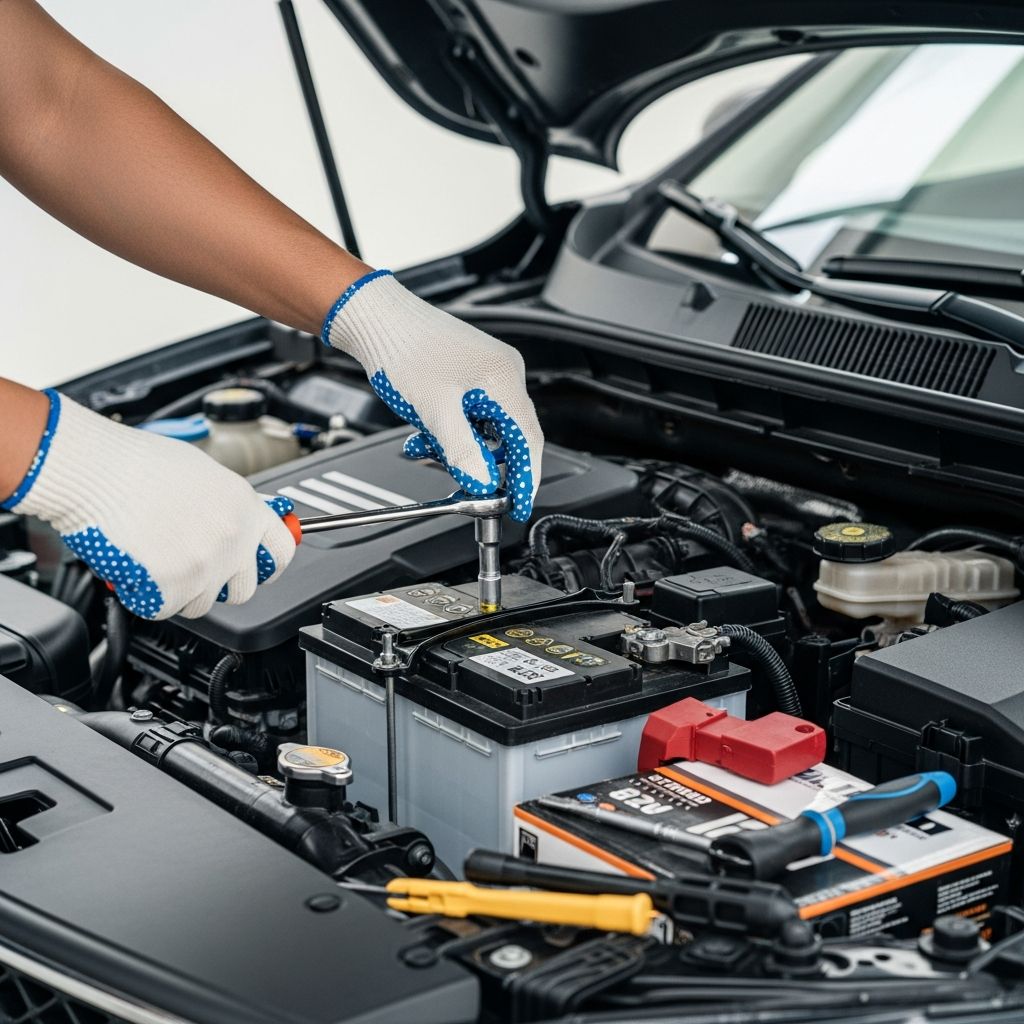
This is the most critical safety step in the entire process. Always disconnect the negative (black) terminal before the positive terminal. Using your socket wrench with the appropriate size socket (usually 8mm or 10mm), loosen the hold-down nut on the negative terminal post. Some terminals may be difficult to remove, so gently wiggle the cable as you loosen it. Once loosened, carefully pull the cable off the terminal post and set it aside. This prevents electrical current from flowing through your body if you accidentally complete a circuit during the removal process.
Step 3: Disconnect the Positive Terminal
With the negative terminal safely disconnected, proceed to remove the positive (red) terminal. If your battery has a plastic cover over the positive terminal, you may need to remove it first by gently prying it off or unsnapping any plastic connectors. Using the same socket and wrench, loosen the hold-down nut on the positive terminal. Remove the cable and set it aside, making sure the two cables don’t touch each other or any metal surfaces on your vehicle.
Step 4: Remove the Battery Hold-Down Strap
Most batteries are secured in place with a hold-down strap that runs across the top or sides of the battery. This strap prevents the battery from moving around while driving. Locate the mounting bolts that secure this strap (typically one or two bolts), and using your socket wrench, loosen them completely. The strap should lift away easily once the bolts are removed. Set the strap and bolts aside in a safe location where you won’t lose them.
Step 5: Lift Out the Old Battery
With the terminals disconnected and the hold-down strap removed, you’re ready to extract the old battery. Batteries are heavy—typically weighing 30 to 50 pounds—so use proper lifting technique. Grip the battery firmly on both sides, keep your back straight, and lift with your legs rather than your back. If you have assistance available, it’s always safer to have someone help you lift. Place the old battery in a safe location, preferably on the ground away from your work area.
Step 6: Clean the Battery Terminals and Clamps
Now is an excellent time to clean the battery terminals and cable clamps. Over time, white, blue, or green corrosion accumulates on these components, which can impede electrical current flow. Purchase an inexpensive battery terminal cleaner from any automotive store—these tools are specifically designed to remove this corrosion. Using the cleaner, scrub both the cable clamps and the posts on the battery tray until they’re shiny and clean. This simple step can improve electrical connection and extend your battery’s life.
Step 7: Position the New Battery
Carefully lower the new battery into the battery tray, ensuring it sits flat and level. The new battery should have the same orientation as the old one, with the positive terminal on the same side and the negative terminal on the other side. Take a moment to verify proper alignment before securing anything in place.
Step 8: Install the Hold-Down Strap
Once the battery is properly positioned, reinstall the hold-down strap using the bolts you removed earlier. Tighten the bolts securely, but be careful not to over-tighten them, as this can crack the battery case. The strap should keep the battery firmly in place without movement.
Step 9: Reconnect the Positive Terminal
Now you’ll reconnect the terminals, but this time in reverse order: positive first, then negative. Place the positive (red) cable onto the positive terminal post and tighten the hold-down nut using your socket wrench. Ensure the connection is tight enough that the cable doesn’t wiggle but not so tight that you risk stripping the threads.
Step 10: Reconnect the Negative Terminal
Finally, reconnect the negative (black) cable to the negative terminal post and tighten the hold-down nut. This final connection completes your battery replacement. Take a moment to verify that both cable connections are secure and that the hold-down strap is properly installed.
What to Do After Battery Replacement
Once you’ve completed the installation, start your vehicle to ensure everything is working properly. Listen for normal engine start sounds and verify that all dashboard lights illuminate briefly before returning to normal. If you notice any unusual sounds or warning lights, turn off the engine immediately and double-check your connections.
After successful installation, apply battery terminal protector spray to the cable connections. This clear coating helps prevent corrosion and extends the life of your connections. Additionally, remove any corrosion cleaner residue with a clean cloth.
Most importantly, dispose of your old battery responsibly. Car batteries contain toxic lead and acid, so never throw them in the trash. Most automotive retailers and service stations accept old batteries for recycling, often providing a core charge credit that can offset the cost of your new battery.
Common Mistakes to Avoid
Understanding what not to do is just as important as knowing the correct procedure. Many people make the mistake of disconnecting the positive terminal first, which can create dangerous electrical arcs. Always disconnect the negative terminal first.
Another common error is over-tightening the terminal connections, which can damage the terminals or crack the battery case. Hand-tight plus a quarter turn with your wrench is usually sufficient. Additionally, never work on your battery while smoking or near open flames, as the hydrogen gas produced by batteries is highly flammable.
Some people skip cleaning the terminals and cable clamps, missing an opportunity to improve electrical connections and prevent future issues. Taking just a few extra minutes to clean these components is well worth the effort.
When to Replace Your Battery
Most car batteries last between three and five years, depending on your climate and driving habits. Hot climates tend to reduce battery life, as extreme heat accelerates chemical reactions within the battery. Cold climates also challenge batteries, requiring them to work harder to start engines in freezing temperatures.
Several warning signs indicate it’s time for a replacement. If your engine cranks slowly when starting, or if you need to turn the key multiple times to start your vehicle, battery replacement may be needed. Warning lights on your dashboard, dim headlights, or electrical problems throughout your vehicle can also signal battery issues. Many automotive stores offer free battery testing, so if you’re unsure, bring your vehicle in for a quick test.
Frequently Asked Questions
Q: How long does it take to replace a car battery?
A: For someone with basic mechanical experience, battery replacement typically takes 15 to 30 minutes. First-time replacements might take up to an hour, but the task becomes quicker with experience.
Q: Can I replace a car battery in the winter?
A: Yes, you can replace a battery in winter, though cold temperatures can make the process slightly more challenging. Batteries work harder in cold weather, so ensure your replacement battery is suitable for cold climates and has adequate cold cranking amps (CCA).
Q: Do I need to reset my car’s computer after battery replacement?
A: Most modern vehicles will reset themselves within a few drive cycles. However, disconnecting the battery might clear your vehicle’s fault codes and temporarily disable certain features. If warning lights persist after replacement, consult your vehicle’s manual or visit a professional mechanic.
Q: What should I do with my old car battery?
A: Never discard batteries in regular trash. Take your old battery to an automotive retailer, service station, or recycling center that accepts lead-acid batteries. Many retailers offer core charges that credit your new battery purchase.
Q: How do I know what battery size to buy?
A: Check your vehicle’s owner’s manual or look at the battery specification sticker under the hood. You can also ask an automotive parts store employee—provide your vehicle’s year, make, and model, and they’ll identify the correct battery type and size.
Q: Is it safe to replace a battery myself?
A: Yes, battery replacement is a safe DIY task when you follow proper safety precautions. Always wear safety glasses and gloves, work in a ventilated area, disconnect the negative terminal first, and never allow metal objects to touch both terminals simultaneously.
References
- How to Replace Your Car Battery — Family Handyman. 2020-11-21. https://www.familyhandyman.com/article/how-to-replace-a-car-battery/
- Battery Safety — U.S. Department of Transportation National Highway Traffic Safety Administration. https://www.nhtsa.gov/
- Car Battery Maintenance and Replacement Guide — Consumer Reports. https://www.consumerreports.org/
- Lead-Acid Battery Recycling — U.S. Environmental Protection Agency. https://www.epa.gov/
Similar Articles





Read full bio of medha deb