Mastering the DT9205A Digital Multimeter
Comprehensive guide to using the DT9205A multimeter for precise voltage, current, resistance, and continuity measurements in DIY projects.
Mastering the DT9205A Digital Multimeter: Your Essential Guide
The DT9205A digital multimeter stands as a versatile, affordable tool for anyone working with electrical circuits, from hobbyists repairing home appliances to professionals diagnosing automotive systems. Capable of measuring DC and AC voltage, current, resistance, capacitance, frequency, and testing diodes and transistors, this device simplifies troubleshooting and ensures precision in readings.
Understanding the DT9205A Components
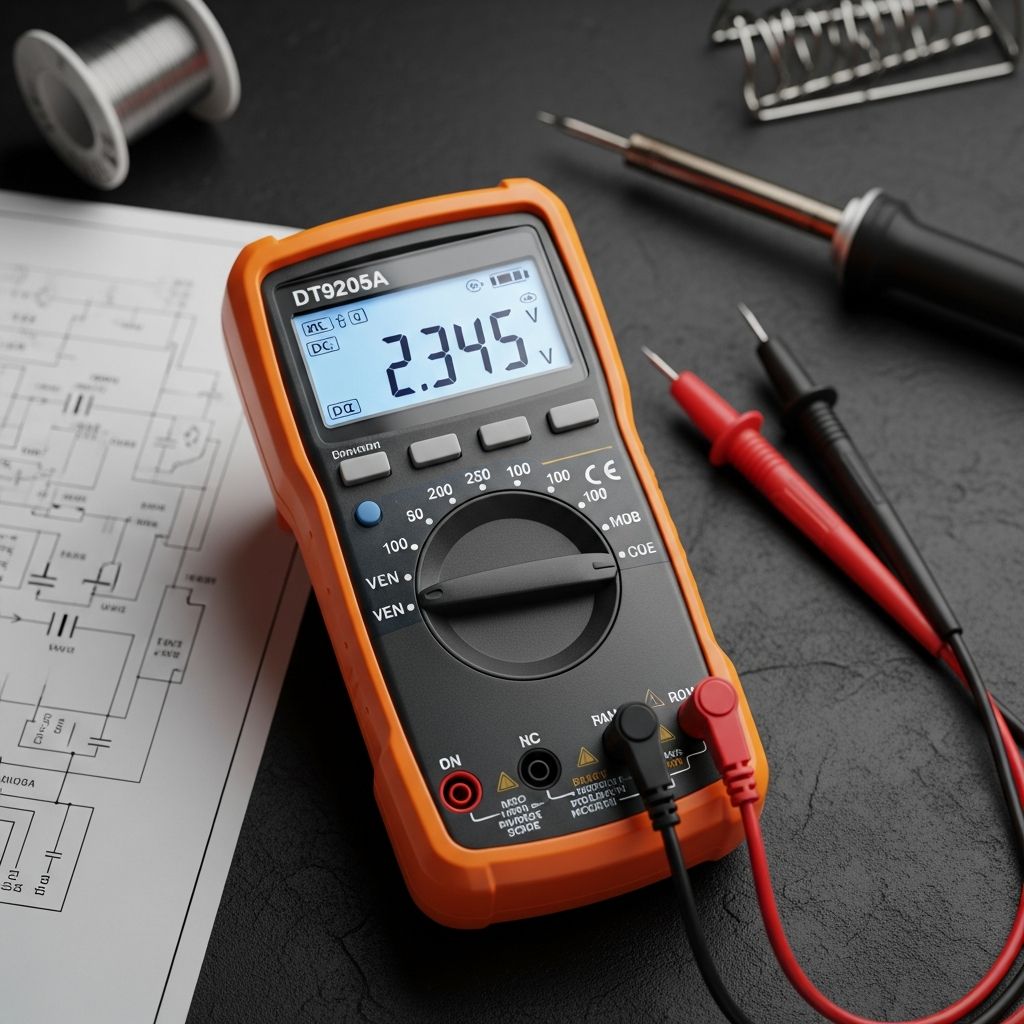
Before diving into measurements, familiarize yourself with the DT9205A’s layout. The large LCD display shows numerical values, bar graphs, and symbols for easy interpretation. The rotary dial selects functions like voltage (V), current (A or mA), resistance (Ω), and more specialized modes. Four ports accommodate test leads: COM for the black probe, V/Ω/mA for voltage/resistance/low current, 10A for high current, and sometimes a dedicated capacitance port.
Key buttons include the range selector for manual adjustment (though it supports auto-ranging), hold for freezing readings, relative mode for offsets, and backlight for low-light use. Test leads feature sharp probes for precise contact, with optional alligator clips for hands-free testing.
Essential Safety Protocols for Multimeter Use
Safety is paramount when handling live circuits. Always verify the DT9205A’s CAT rating—typically CAT II or III up to 600V—to match your environment, preventing arc flashes or shocks. Inspect leads for fraying and ensure fuses are intact before use.
- Power off circuits when possible, especially for resistance or continuity tests.
- Start with highest range for unknown voltages to avoid overload.
- Never touch exposed metal on probes during live tests.
- Use insulated tools and wear protective gear in high-voltage scenarios.
- Avoid mixing ports: wrong insertion can blow internal fuses.
These practices align with industry standards from manufacturers like Fluke, reducing risks in residential or industrial settings.
Step-by-Step: Measuring DC Voltage
DC voltage testing is ideal for batteries, solar panels, or vehicle systems. Insert the black lead into COM and red into V/Ω. Rotate the dial to the DCV symbol (straight and dotted line under V). For auto-range models like the DT9205A, it adjusts automatically; otherwise, start at 600V and dial down.
Touch red probe to positive (+) terminal, black to negative (-). A positive reading confirms correct polarity; negative indicates reversal. Example: A healthy 12V car battery reads 12.4-12.7V. If OL (overload) appears, increase range or check connections.
| Application | Expected Range | Troubleshooting Tip |
|---|---|---|
| AA Battery | 1.5V | Below 1.2V: Replace |
| Car Battery | 12-14V | Under 12V: Charge needed |
| Solar Panel | 18-20V (open circuit) | Zero: Check wiring |
Testing AC Voltage Accurately
AC voltage checks household outlets or appliances. Set dial to ACV (wavy line under V), black lead in COM, red in V/Ω. Start at 600V range for 120V outlets. Insert probes into hot (smaller slot/narrower prong) with red and neutral/ground (wider slot) with black. Expect 110-120V in the US.
For safety, use a non-contact voltage tester first. Readings fluctuating wildly suggest loose wiring; zero volts indicates a tripped breaker. Always remove red probe first when disconnecting.
Current Measurement: DC and AC
Unlike voltage (parallel connection), current requires series insertion, breaking the circuit. For low currents (<200mA), use mA port; high (>10A) uses 10A port, often unfused. Set dial to DCA or ACA, start at 10A range.
For DC: Test lead in series with load, e.g., measure a motor’s draw from a battery. Positive flow from red to black. AC example: Clamp or inline test an appliance’s consumption—coffee maker might pull 8-10A at 120V. Beware: Incorrect setup blows fuses; replace with exact ratings.
Resistance and Continuity Checks
Resistance (Ω) diagnoses components like fuses or wires. Power off circuit completely. Set to Ω, probes in V/Ω and COM. Touch probes together for near-zero (short); infinite (OL) means open. For a 1kΩ resistor, reading should match color bands within 5%.
Continuity mode beeps for low resistance (<50Ω), perfect for wire integrity. Probe ends of a fuse: beep = good; silence = blown.
Advanced Functions: Diodes, Capacitors, and More
The DT9205A excels in diode testing: Forward bias (red to anode) shows 0.5-0.7V drop; reverse is OL. Capacitance mode discharges and measures µF—useful for filter caps. Frequency (Hz) checks signals from generators; transistor test verifies hFE gain.
Use relative (REL) mode to zero out lead resistance for precise low-Ω readings. Data hold freezes unstable values.
Practical Applications and Troubleshooting Tips
DIY Home Repairs: Verify outlet voltage, test GFCI trips, check appliance continuity.
Automotive: Battery health, alternator output (13.8-14.4V engine running), starter draw.
Electronics: Component values, PCB shorts/opens.
Common issues: Erratic readings? Clean probes, check battery (9V typical). No display? Replace fuse. Always calibrate against known sources.
Frequently Asked Questions (FAQs)
What if my DT9205A shows ‘1’ or OL?
This indicates overload or open circuit—increase range or verify connections.
Can I measure high currents without the 10A port?
No—use appropriate port or external shunt to avoid damage.
How do I test a transistor?
Insert into socket per pinout (NPN/PNP), read hFE value—good if within datasheet specs.
Is the DT9205A suitable for automotive use?
Yes, handles up to 10A DC and 600V, ideal for batteries and charging systems.
What’s the battery life like?
9V battery lasts 100-200 hours; auto-off conserves power.
Choosing and Maintaining Your Multimeter
Select based on accuracy (±1% typical), auto-range, True RMS for distorted AC, and durability (rubber holster). Store in dry conditions, replace fuses promptly (200mA fast-blow, 10A slow-blow). Regular zeroing ensures reliability.
Expand with accessories: Flexible current clamps for non-invasive AC/DC amps, temperature probes via adapter.
References
- How to Use a Digital Multimeter: A Beginner’s Guide — Renogy US. 2023-05-15. https://www.renogy.com/blogs/buyers-guide/how-to-use-a-digital-multimeter
- Digital Multimeter Basics: Troubleshooting Essentials — RealPars. 2024-02-10. https://www.realpars.com/blog/digital-multimeter-basics
- How to Use a Multimeter — SparkFun Learn. 2023-11-20. https://learn.sparkfun.com/tutorials/how-to-use-a-multimeter/all
- Digital Multimeter Basics Online Course — Fluke Corporation. 2025-01-01. https://www.fluke.com/en-us/learn/online-courses/digital-multimeter-basics-online-course
- Comprehensive Guide: How to use a Multimeter — NTI Now. 2024-08-05. https://ntinow.edu/how-to-use-a-multimeter/
Similar Articles




Read full bio of Sneha Tete