Puck Light Installation: Complete DIY Guide With Pro Tips
Transform your kitchen or workspace with expert puck light setup: from planning to flawless execution for any power type.
Mastering Puck Light Installation: A Complete DIY Guide
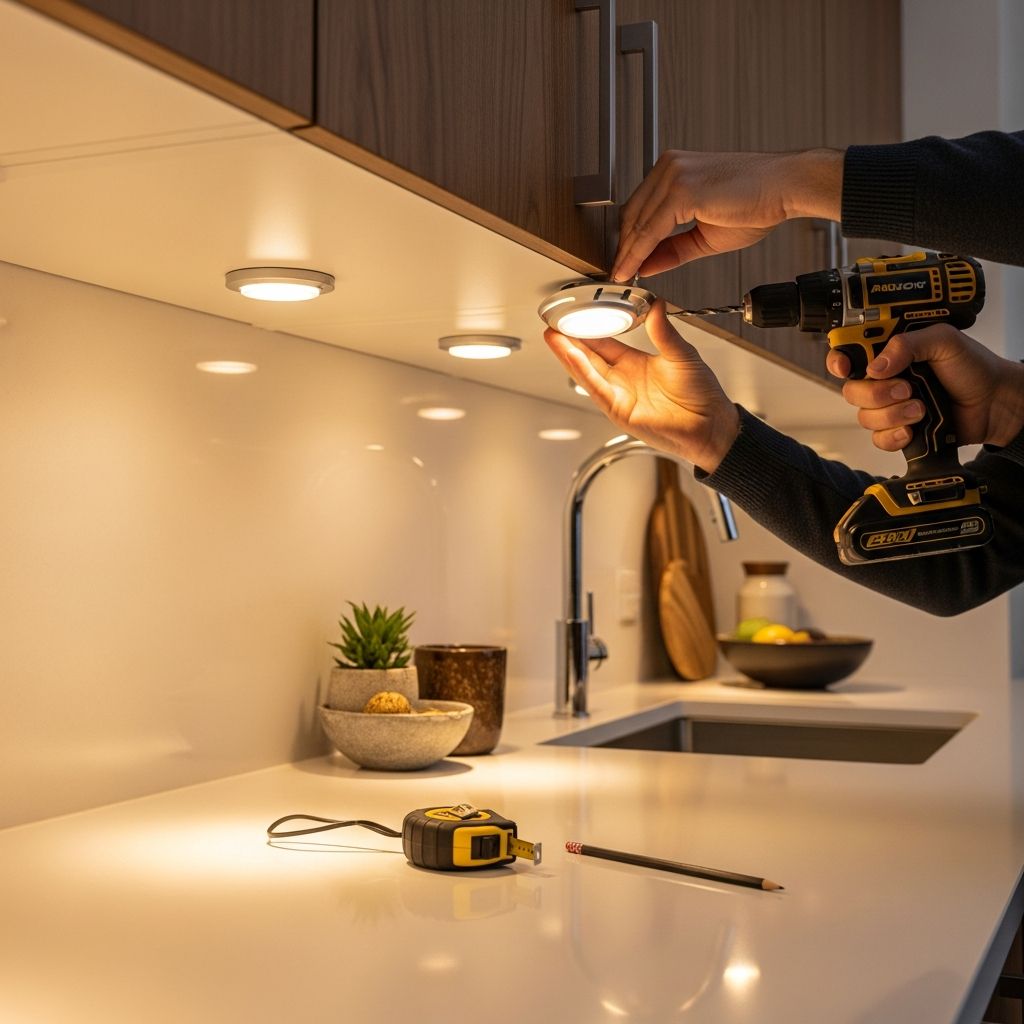
Puck lights offer versatile, focused illumination ideal for kitchens, workshops, and display areas. These compact LED fixtures provide task lighting without overwhelming spaces, enhancing functionality and aesthetics. This guide details every aspect of installation, from initial planning to final testing, ensuring safe and effective results across hardwired, plug-in, and battery-powered systems.
Understanding Puck Lights and Their Benefits
Puck lights are small, round LED fixtures, typically 2-4 inches in diameter, designed for recessed or surface mounting. They excel in under-cabinet applications, directing bright, even light onto countertops to minimize shadows and improve visibility for food prep or detailed work. Unlike linear strips, pucks allow customizable placement, making them suitable for irregular cabinet layouts.
Key advantages include energy efficiency—drawing minimal power while outputting 300-500 lumens per unit—long lifespan up to 50,000 hours, and dimmable options for ambiance control. Available in warm (2700K) to cool (5000K) color temperatures, they adapt to any decor. Proper installation maximizes these benefits, preventing hotspots or glare.
Planning Your Puck Light Project
Success starts with thoughtful design. Measure your cabinet length and determine light needs: task areas require 12-18 inch spacing for overlap, while accent lighting suits wider gaps up to 24 inches. Calculate total lumens—aim for 30-50 per square foot on work surfaces.
- Assess power availability: proximity to outlets favors plug-in; existing wiring suits hardwired.
- Choose voltage: low-voltage (12V/24V DC) needs transformers; line-voltage (120V AC) connects directly.
- Consider beam angle: narrow (30-45 degrees) for focused tasks, wider (60-120 degrees) for general coverage.
- Check cabinet depth: recessed installs need at least 2 inches clearance.
Sketch a layout on paper or use apps for visualization. Factor in controls like dimmers or motion sensors for added convenience.
Essential Tools and Materials
Gather supplies beforehand to avoid delays. Core tools include a drill with hole saw bits (1-3 inches for recessed), screwdriver set, wire strippers, voltage tester, and tape measure. Safety gear: gloves, safety glasses, and ladder.
| Installation Type | Required Materials |
|---|---|
| Hardwired | Romex cable, junction box, wire nuts, transformer (if low-voltage), conduit if code-mandated. |
| Plug-in | Cord clips, raceways, extension cord, screws/adhesive mounts. |
| Battery | Adhesive pads, isopropyl alcohol, spare batteries/charger. |
Optional: fish tape for wire routing, label maker for circuits. Always select UL-listed components for safety compliance.
Safety Protocols Before Starting
Electricity poses risks; prioritize precautions. Shut off power at the breaker and confirm with a non-contact voltage tester—no lights or beeps mean safe. Work in well-lit areas, avoid wet conditions, and use grounded tools.
- Consult local electrical codes; hardwired jobs often require permits or professionals.
- Wear insulated gloves for wiring.
- Test fixtures pre-installation.
- Keep children/pets away.
For hardwired, ground all metal parts. If unsure, hire a licensed electrician—improper work risks fires or shocks.
Step-by-Step: Hardwired Puck Light Installation
Hardwiring delivers seamless, switch-controlled lighting but involves mains electricity. Ideal for permanent kitchen upgrades.
- Mark Positions: Tape a string line under cabinets for even spacing. Mark centers with pencil.
- Power Off and Prep: Breaker off, test voltage. Install junction box per code (e.g., inside cabinet top).
- Run Wiring: Feed NM cable (Romex) from panel or switch to box. Strip sheath, leave 6-inch tails.
- Mount Fixtures: For surface: screw base ring directly. Recessed: drill precise holes with template, insert pucks.
- Wire Connections: Match hot/black to hot, neutral/white to neutral, ground/bare to ground. Use transformer for DC pucks: DC+ to puck +, DC- to -.
- Secure and Test: Tuck wires, close box, restore power. Adjust aim, check for heat.
Pro Tip: Daisy-chain pucks with linking cables up to 10 units or 220W max.
Plug-In Puck Lights: Easiest DIY Option
Perfect for renters or quick installs—no electrician needed. Route cords neatly for pro finish.
- Select Outlet: Identify GFCI-protected source nearby; plan path avoiding doors.
- Position and Mount: Separate puck from ring, align screw holes, pre-drill pilots (1/16 inch). Notch for cord exit.
- Conceal Wiring: Drill 1.25-inch access holes between pucks; thread linking cords. Surface: use clips every 12 inches.
- Link and Plug: Connect daisy-chain (max 19-inch spacing), cap ends, plug in.
- Test Layout: Power on, tweak positions before permanent adhesive.
Enhance with slim transformers hidden in cabinets.
Battery-Powered Puck Lights: Wireless Simplicity
Zero wiring for remote spots. Rechargeable models last 4-20 hours per charge.
- Prep Surface: Wipe with alcohol; dry 5 minutes.
- Test and Position: Verify brightness/runtime. Space for coverage.
- Mount Securely: Apply heavy-duty adhesive or magnets. Press 30 seconds; cure 24 hours.
- Install Batteries: Use specified type (AA, lithium-ion). Program timers if available.
- Monitor: Check monthly; replace as needed.
Ideal for closets or RVs; combine with motion activation.
Design Tips for Optimal Lighting Layouts
Avoid common pitfalls like shadows over sinks. Front-zone pucks for tasks, rear for ambiance. Use 3500K for versatility.
- Zigzag pattern on long runs.
- Dimmer-compatible for evenings.
- Integrate with smart home (Alexa-compatible models).
Layer with overheads for balanced illumination.
Troubleshooting Common Issues
| Problem | Solution |
|---|---|
| Flickering | Check loose wires, transformer capacity, voltage drop. |
| Dim Output | Verify lumens match load; clean lenses. |
| No Power | Test breaker, connections, fuses. |
| Overheating | Ensure ventilation; downsize if overloaded. |
For persistent issues, reference manuals or consult pros.
Maintenance and Longevity
LED pucks need little upkeep: dust monthly, avoid harsh cleaners. Expect 10+ years with proper use. Upgrade batteries yearly for wireless types.
Frequently Asked Questions (FAQs)
Can I install puck lights myself?
Yes for plug-in/battery; hardwired best left to experts unless experienced.
How many pucks per cabinet?
One every 12-18 inches for 36-inch cabinet: 3-4 units.
Are puck lights dimmable?
Many are; match with compatible dimmer to avoid buzzing.
Recessed or surface mount?
Surface for simplicity; recessed for sleek look if cabinet allows.
Cost range?
$10-50 per puck; full kit $50-300 depending on type.
References
- How to Install Puck Lights: Placement, Wiring, and Layout Guide — Lumaz Life. 2023. https://lumazlife.com/blogs/puck-lights/how-to-install-under-cabinet-puck-lights
- Puck Lights Fixture Install — YouTube (Armacost Lighting). 2022-06-15. https://www.youtube.com/watch?v=w29YnJzVGHo
- How to Install a Puck Light: A Step-by-Step Guide — aspectLED. 2024. https://www.aspectled.com/blog/post/how-to-install-a-puck-light-a-step-by-step-guide/
- Wiring LED Puck Lights — Armacost Lighting. 2023. https://www.armacostlighting.com/blogs/news/how-to-wire-puck-lights
Similar Articles



Read full bio of medha deb