Mastering Scotts Turf Builder Spreader Settings
Unlock precise lawn care with expert tips on calibrating and using Scotts Turf Builder spreaders for optimal results.
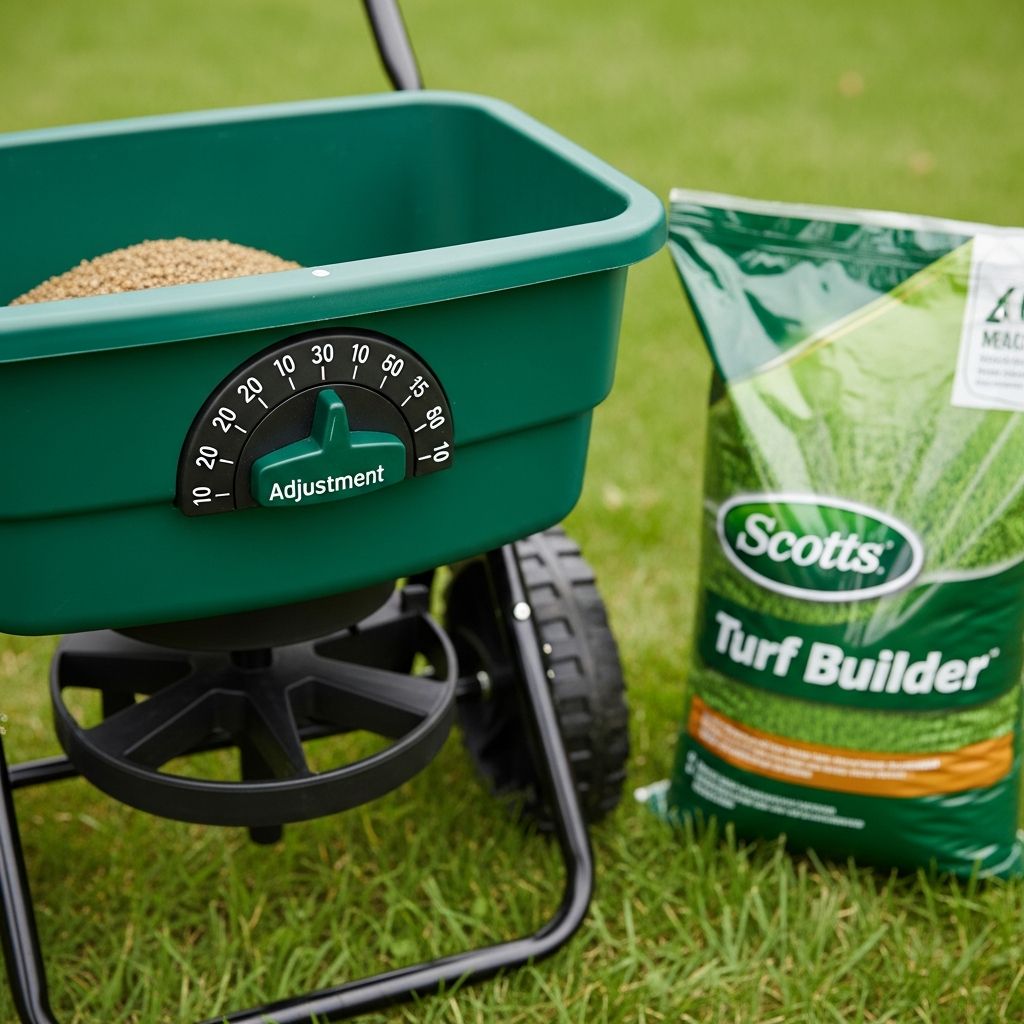
Achieving a lush, vibrant lawn starts with precise application of fertilizers, seeds, and treatments. Scotts Turf Builder spreaders, such as the EdgeGuard Mini and Deluxe models, simplify this process by delivering consistent coverage. These tools feature adjustable dials, EdgeGuard technology to protect non-lawn areas, and designs optimized for granular products. Proper setup ensures your grass receives the right amount of nutrients without waste or uneven growth.
Understanding Broadcast Spreaders and Their Role in Lawn Health
Broadcast spreaders distribute products in a wide, overlapping pattern, ideal for large areas. Unlike drop spreaders that apply material directly beneath the unit, broadcast models like Scotts Turf Builder propel granules outward via rotating plates. This method promotes uniform feeding, reducing risks of over-fertilization in spots that can burn grass or cause patchy growth.
Key benefits include efficiency for lawns up to 5,000 square feet or more, depending on the model. The EdgeGuard feature blocks one side of the spread pattern, preventing granules from landing on driveways, sidewalks, or flower beds. Regular use supports denser turf, better weed resistance, and improved recovery from stress.
Identifying Your Scotts Turf Builder Model
Scotts offers several Turf Builder spreaders, each suited to different yard sizes and needs. The compact EdgeGuard Mini holds product for 5,000 sq. ft. and folds for storage. Larger options like the Deluxe or Elite handle bigger areas with enhanced durability, such as 10-inch tires and stainless steel components.
- EdgeGuard Mini: Pre-calibrated, portable for small to medium lawns.
- EdgeGuard Deluxe: Wider pattern for faster coverage on mid-sized yards.
- Elite Spreader: Professional-grade with 20,000 sq. ft. capacity and dual rotors.
Check the hopper label or product packaging to confirm your model. Each includes a rate control dial typically ranging from 1 to 15 or higher.
Finding the Correct Spreader Settings
Settings vary by product type—fertilizer, seed, weed control, or ice melt. Always consult the product bag for specific recommendations tailored to Scotts broadcast spreaders.
To locate settings:
- Visit the official Scotts website and search for your product.
- Open the product page, scroll to ‘Spreader Settings’ or ‘Specs & Details.’
- Download the label PDF for a full chart listing settings by spreader model and application rate.
For example, common fertilizers might recommend settings between 4-6 for standard rates. Test on a small area if unsure, as grass type, soil, and climate influence needs.
Step-by-Step Calibration Process
While many Scotts spreaders arrive pre-calibrated, verifying accuracy prevents issues. Calibration matches the dial to your walking speed and product density.
| Step | Action | Tips |
|---|---|---|
| 1. Measure Test Area | Mark a 1,000 sq. ft. plot (e.g., 20×50 ft). | Use string or cones for precision. |
| 2. Weigh Product | Record weight needed per 1,000 sq. ft. from bag (e.g., 4 lbs). | Use a scale for exact amounts. |
| 3. Set Dial & Spread | Fill hopper, walk steadily at normal pace, covering the area. | Overlap passes by 5 ft. |
| 4. Check Remainder | Weigh leftover product; adjust dial if too much/too little remains. | Repeat until accurate. |
This process, recommended by turf experts, ensures even distribution.
Preparing Your Spreader for Use
Before filling, inspect for damage: check wheels, axle, trigger lever, and hopper for clogs. Assemble if needed—slide wheels onto axle, secure with washers and cotter pins. Fold out the handle on compact models.
Clean thoroughly after prior uses to avoid contamination. For storage, empty completely, fold handles, and store dry.
Optimal Application Techniques
Follow these proven methods for professional results:
- Perimeter Pass: Start with EdgeGuard ON, outline the lawn to protect edges.
- Fill Interior: Turn EdgeGuard OFF, make parallel passes in the lawn’s longest direction, overlapping by 5 ft to match wheel tracks.
- Steady Pace: Walk at 3 mph; squeeze trigger after starting motion, release at turns or stops to avoid overlaps.
- Cleanup: Sweep spills from hard surfaces back onto grass.
Apply when grass is dry, wind is low, and avoid watering immediately after to let products adhere.
Troubleshooting Common Issues
Uneven coverage often stems from incorrect settings or speed variations. If granules clump, the dual-bladed agitator may need cleaning. For EdgeGuard malfunctions, ensure the switch fully engages the blocker.
Table of Frequent Problems:
| Issue | Cause | Solution |
|---|---|---|
| Streaks in Lawn | Inconsistent speed or no overlap | Practice steady walk; align with prior tracks |
| Product Skips | Hopper clog or low setting | Clear agitator; increase dial gradually |
| Over-Application | Trigger held during turns | Release lever promptly |
Seasonal Uses Beyond Fertilizer
Scotts Turf Builder spreaders handle versatile tasks:
- Seeding: Use lower settings for fine grass seed; EdgeGuard prevents overspread near fences.
- Weed Control: Precise rates target invaders without harming turf.
- Ice Melt: Distribute salt alternatives on walkways (avoid rock salt).
Winter prep includes fall fertilization for root strength.
Maintenance for Longevity
Regular care extends spreader life:
- Empty after each use; store product in original bags.
- Wipe hopper and plates; lubricate moving parts sparingly.
- Inspect tires and axles annually; replace cotter pins if bent.
Scotts offers a No-Quibble Guarantee; register at their site for support.
Frequently Asked Questions (FAQs)
What setting should I use for Scotts Turf Builder fertilizer?
Settings range from 4-7 typically; check the product label or Scotts website for your specific fertilizer and spreader model.
How do I know if my spreader is calibrated correctly?
Test on a measured 1,000 sq. ft. area using the bag’s recommended weight; adjust if output doesn’t match.
Can I use the spreader for ice melt?
Yes, for sidewalks and driveways with appropriate products, but not rock salt to avoid damage.
What’s the difference between Mini and Deluxe models?
Mini is compact for smaller lawns; Deluxe offers wider coverage and larger hopper for bigger areas.
How often should I calibrate my spreader?
Once per season or when switching products, as granule sizes vary.
Advanced Tips for Professional Results
For enthusiasts, map your lawn digitally to calculate exact product needs. Combine with soil tests from extension services for tailored nutrition. Pair seeding with aeration or dethatching for superior germination. Track applications in a log to refine future settings.
Invest in quality granules; uneven products demand recalibration. In variable terrains, the Elite’s never-flat tires maintain consistency.
References
- How To Use Scotts® Turf Builder® Edgeguard® Mini Broadcast Spreader — Scotts Lawn (YouTube). 2022-07-08. https://www.youtube.com/watch?v=vZypHuz2KTE
- How to Use a Scotts® Broadcast Spreader on Your Lawn — Scotts Lawn (YouTube). 2016-01-18. https://www.youtube.com/watch?v=_g-B-IrfpAA
- Scotts Turf Builder Edgeguard Seed Spreader Walk Through — FixAnythingSaveMoney (YouTube). 2023-04-01. https://www.youtube.com/watch?v=M4qH2lw4hKw
- How to Find Your Scotts Spreader Settings — ScottsMiracle-Gro US. Accessed 2026. https://scottsmiraclegro.com/en-us/learn/lawn-care/how-to-find-your-scotts-spreader-settings.html
- Elite Spreader Instruction Pamphlet — Scotts (PDF). Accessed 2026. https://images.thdstatic.com/catalog/pdfImages/18/18c37ee3-e012-4026-a143-9acb2c84a4b9.pdf
Similar Articles



Read full bio of Sneha Tete