Signs Your Dimmer Switch Is Failing: 5 Warning Signs And Fixes
Learn to spot and fix dimmer switch problems like flickering, buzzing, and total failure for safer, brighter home lighting.
Signs Your Dimmer Switch Is Failing
Dimmer switches offer versatile control over home lighting, allowing you to adjust brightness for ambiance or energy savings. However, when they malfunction, issues like inconsistent light levels or strange noises can disrupt your space. Understanding the warning signs of a failing dimmer helps you address problems early, preventing bigger electrical hazards.
Understanding How Dimmer Switches Operate
Dimmer switches regulate power to lights by rapidly interrupting the electrical current, creating the illusion of dimming without visible flickering. This process, known as phase cutting, works best with compatible bulbs and proper wiring. Mismatches in load or bulb type often lead to early failure. Modern dimmers handle LED and CFL bulbs if rated for them, but older models struggle with these energy-efficient options.
Common Symptoms of Dimmer Switch Failure
Recognizing issues promptly can save time and money. Here are the most frequent signs:
- Flickering Lights: Lights that pulse or strobe, especially at certain brightness levels, indicate voltage instability.
- Audible Buzzing or Humming: A persistent noise from the switch or bulbs signals overload or component wear.
- Inconsistent Dimming: Lights that won’t dim smoothly or cut out at extremes.
- Total Power Loss: No response from the switch, even with working bulbs elsewhere.
- Overheating: Switch feels warm to the touch after short use, a fire risk.
Why Dimmer Switches Fail: Key Causes
Several factors contribute to dimmer burnout. Overloading occurs when connected fixtures exceed the switch’s wattage rating, causing internal components to overheat. Incompatible bulbs, like non-dimmable LEDs on standard dimmers, create electrical stress. Loose wiring interrupts current flow, leading to arcing and damage. Environmental factors, such as moisture exposure from leaks, corrode contacts over time.
| Failure Cause | Symptoms | Common Fixes |
|---|---|---|
| Overload | Overheating, buzzing | Reduce wattage, upgrade switch |
| Incompatible Bulbs | Flickering, humming | Switch to dimmable LEDs |
| Loose Connections | Intermittent power | Tighten wires, inspect terminals |
| Age/Wear | No response, flickering | Full replacement |
Step-by-Step Troubleshooting Guide
Before replacing your dimmer, follow these safe steps. Always turn off power at the breaker.
- Verify Power Supply: Test if the circuit works with a standard switch or bulb in another outlet.
- Inspect Bulbs: Swap with known dimmable, compatible bulbs. Check manufacturer compatibility tools for LEDs.
- Check Wattage Load: Calculate total fixture wattage against switch rating. For multi-bulb setups, sum individual ratings.
- Listen for Noise Source: Determine if buzzing comes from switch or bulbs by isolating components.
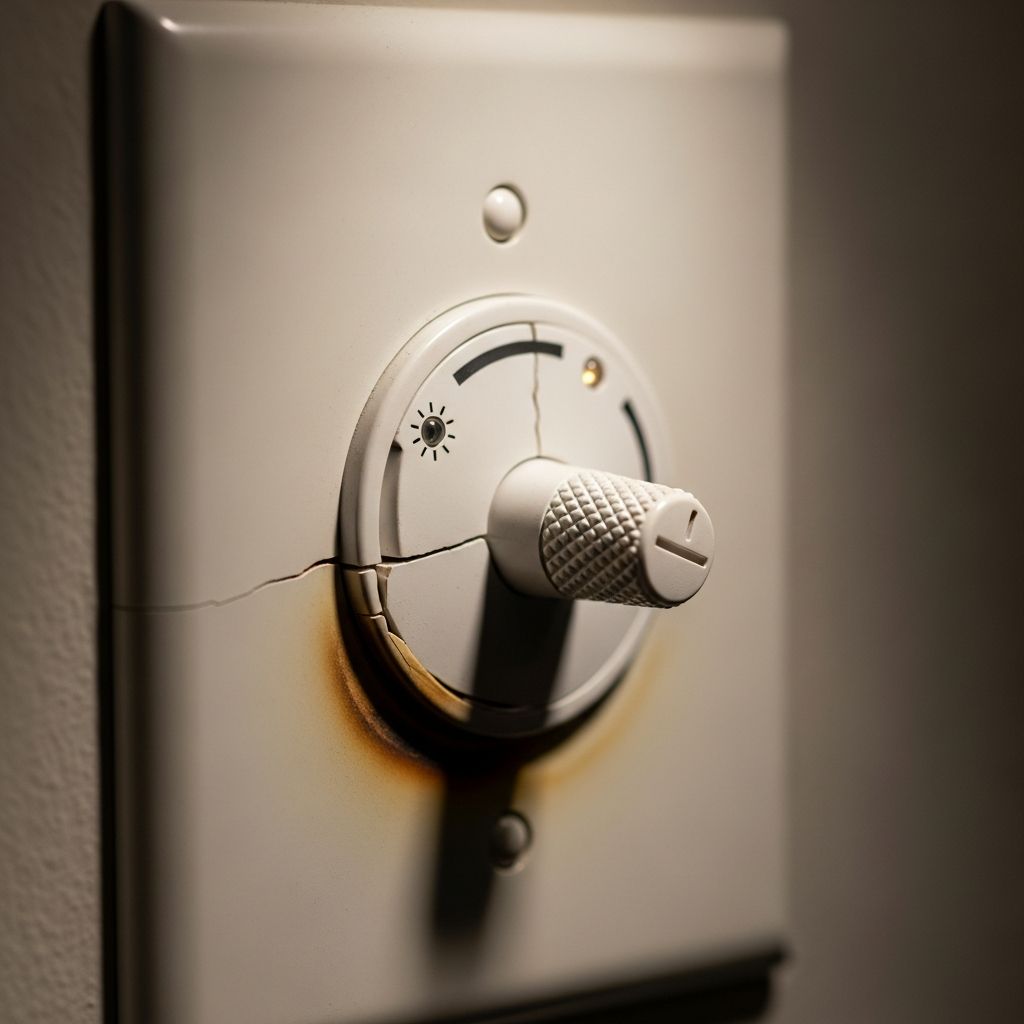
- Examine for Damage: Look for burn marks, melted plastic, or corrosion after removing the faceplate.
- Adjust Trim Settings: On advanced models, tweak low/high-end trim to stabilize output.
If issues persist, wiring problems or a defective unit may require professional diagnosis.
Bulb Compatibility: A Frequent Culprit
Not all bulbs pair with dimmers. Incandescent and halogen work universally, but LEDs and CFLs need ‘dimmable’ labeling. Non-compatible bulbs cause flickering as the dimmer’s rapid cycling confuses their drivers. Use tools from brands like Lutron to verify matches. For low-voltage setups, ensure electronic low-voltage (ELV) dimmers match transformers.
- Incandescent: Universal compatibility.
- Dimmable LED/CFL: Check packaging and tools.
- Non-dimmable: Avoid entirely; causes failure.
Diagnosing Buzzing and Humming Issues
Buzzing arises from electromagnetic vibrations in the switch or bulb filaments under modulated voltage. Test by reducing load—remove bulbs from multi-fixture setups. If noise persists from the switch, it’s likely worn internals unable to handle voltage spikes. Older or low-quality dimmers amplify this. Water damage exacerbates issues by shorting circuits, leading to hums and flickers.
Safety Precautions During Inspection
Electricity poses risks—never work on live circuits. Use a non-contact voltage tester post-breaker shutoff. Wear insulated gloves. If you smell burning or see sparks, evacuate and call an electrician immediately. Annual inspections prevent failures, especially in humid areas.
When to Replace Your Dimmer Switch
Replacement is warranted if troubleshooting fails or damage is visible. Choose ratings 20-30% above load for longevity. For smart homes, opt for Wi-Fi models with app control. Low-voltage systems demand specific ELV or magnetic types. Professional installation ensures code compliance.
Preventive Maintenance for Longevity
Extend dimmer life by matching loads, using quality bulbs, and avoiding overloads. Clean faceplates periodically to prevent dust buildup. In multi-switch setups (3-way), ensure all are dimmer-rated. Regular breaker tests catch upstream issues early.
Advanced Dimmer Features and Upgrades
Modern dimmers offer presets, motion sensing, and LED compatibility. Smart variants integrate with voice assistants for hands-free control. When upgrading, consider energy-efficient models reducing phantom loads. For large homes, zoned systems provide granular control.
Frequently Asked Questions
Why do my lights flicker on a dimmer?
Flickering often stems from incompatible bulbs or overload. Test with dimmable LEDs and verify wattage.
Is buzzing normal for dimmers?
No, it indicates stress. Lower wattage or replace the switch if persistent.
Can I use LED bulbs with any dimmer?
Only dimmable LEDs with compatible dimmers. Check manufacturer tools.
How do I know my dimmer’s wattage rating?
It’s printed on the device or packaging. Sum fixture loads to compare.
Should I replace a buzzing dimmer myself?
If comfortable with electrics, yes—but pros handle complex wiring safely.
Choosing the Right Replacement Dimmer
Select based on bulb type, load, and features. Incandescent/halogen: Standard dimmers. LED/CFL: Advanced models. Low-voltage: ELV-specific. Read ratings carefully for 3-way compatibility.
References
- 5 Common Problems with Your Dimmer Switch — My Reliable Power. 2023. https://myreliablepower.com/blog/5-common-problems-with-your-dimmer-switch/
- Tips for Troubleshooting a Buzzing Dimmer Switch — Prairie Electric. 2024-05-15. https://www.prairielectric.com/residential-resources/tips-for-troubleshooting-a-buzzing-dimmer-switch/
- Maestro PRO Troubleshooting Guide — Lutron Support Center. 2025-01-10. https://support.lutron.com/us/en/product/maestro/article/troubleshooting/MA-PRO-FAQ-Troubleshooting-Guide
- How to Troubleshoot a Dimmer Switch — This Old House (YouTube). 2023-08-20. https://www.youtube.com/watch?v=z_KUYgcgx9Y
Similar Articles



Read full bio of Sneha Tete